


Showing posts with label Scrapporreia. Show all posts
Showing posts with label Scrapporreia. Show all posts
Wednesday, October 12, 2011
Halloween Brag Book Page
I'm counting the days until Halloween. I love that time of year... and I don't even like candy! This year, we'll be going to my son's first school dance (and costume party), a neighborhood Halloween party, trick or treating and a few other costume-related events. Lots of chances for some memory making and scrapping. Here is a page to go with last week's freebie, from the Night of Mischief kit. To download your file, click on the image

Wednesday, October 5, 2011
Brag Book Halloween Quickpage
Boo! I love the feeling of Fall - when crispness hits the air. It means Halloween is around the corner and that means costume parties, trick or treating, and cute kiddies in parades. Here is a brag book quickpage to scrap some of the pictures from these upcoming events. The kit is Wimpy Chompers' Night of Mischief that you can check out from the prior post. Isn't it too cute??
Enjoy!
Here is a preview of the page you'll get by clicking on the image below. I used pictures of my DS playing dress up with all his costumes. Kids do love playing dress up, don't they?

Enjoy!
Here is a preview of the page you'll get by clicking on the image below. I used pictures of my DS playing dress up with all his costumes. Kids do love playing dress up, don't they?

Wednesday, September 14, 2011
Welcome Students brag book Quick Page
Its back to school time and Wimpy Chomper's Creations came up with an oh-so-cute kit to help us scrap it. As this week's freebie, I've created 2 brag book quick pages for you to quickly put some of your cuties into an albumfor Gramma or Grampa.
To download them, click on the image below.

To download them, click on the image below.
Here is a preview of her kit

Wednesday, September 7, 2011
Brag Book freebie
Hello all,
I missed a Wednesday freebie last week due to the hurricane that hit the East Coast. What a month it was. Now that most of the aftermath is behind us, here is our weekly Wednesday freebie created from Wimpy Chomper's Just Call Me Elder kit that you can read all about here.
This is another in the series of Brag Book Quick pages. I used it to create my son's first day of Kindergarten page. To download, click here or on the image of the preview.


I missed a Wednesday freebie last week due to the hurricane that hit the East Coast. What a month it was. Now that most of the aftermath is behind us, here is our weekly Wednesday freebie created from Wimpy Chomper's Just Call Me Elder kit that you can read all about here.
This is another in the series of Brag Book Quick pages. I used it to create my son's first day of Kindergarten page. To download, click here or on the image of the preview.

Tuesday, August 23, 2011
Wacky Wednesday
I'm actually posting this on Tuesday night and if you are on the East side of the US, you probably heard about the 5.8 earthquake that hit in Virginia and up and down the states. It was scary and crazy in the Northeast, especially NYC. I had to evacuate down 41 flights of stairs, walk 45 minutes across town to catch my train home. Even then, it was over an hour before I got home, and by then, my legs were jello. Exhausting and scary. Did you feel the earthquake? Where were you and what were you doing today?
Needless to say, when I got home, I was wiped out. I've only got one brag book page for you guys. Its from Wimpy Chomper's Sports Nut Girl kit. I used the blue one because I just love blue.
enjoy! click on the image to download this freebie.

Needless to say, when I got home, I was wiped out. I've only got one brag book page for you guys. Its from Wimpy Chomper's Sports Nut Girl kit. I used the blue one because I just love blue.
enjoy! click on the image to download this freebie.
Tuesday, August 16, 2011
Wednesday Giveaway - Sunday Best brag book QP
Wimpy Chompers unique kit Sunday Best made for some pretty quickpages for our brag book set. (Available at ScrapMatters)
 < Here are my freebies. Just click on the image to download:
 < Here are my freebies. Just click on the image to download:
Tuesday, August 9, 2011
Wednesday Brag Book Giveaway
I love being the Wednesday giveaway girl for Wimpy Chompers Designs. Its the middle of the week, we are half way to the weekend and who doesn't love that?
Here is this week's contribution to the growing brag book pages. I created these using the recently released Crafty Me kit available at ScrapMatters.

click on the image to download the file... Enjoy!

Here is this week's contribution to the growing brag book pages. I created these using the recently released Crafty Me kit available at ScrapMatters.

click on the image to download the file... Enjoy!
Wednesday, July 27, 2011
Wednesday WC Freebie
Hi, Scrapporreia (Linda) here with my Wednesday Freebie.
I'm taking a break from the brag book quickpages this week because I created this blog post ages ago and never uploaded it. Its too cute not to share, so here you go!

Happy humpday everyone!!
I'm taking a break from the brag book quickpages this week because I created this blog post ages ago and never uploaded it. Its too cute not to share, so here you go!
I love taking Wimpy Chompers' fun kits and seeing what I can do with them for you guys-how I can take her kit and make a fun freebie that you'd be able to use in your everyday life.
Today, I'm giving y'all a free cutable (is that a word?) printable envelope file using Flying My Plane. It was such a fun kit, I had to use it for this freebie. Click here to get the 300 dpi printable version.
Since Christina has put out so many kits lately, here is a preview of Flying My Plane for those of you who haven't see it -- or those that would like a refresher. Of course, its available at ScrapMatters' shop.
Happy humpday everyone!!
Work week's nearly done - yippee!
:)
Wednesday, July 20, 2011
Miss Rachel Quickpage giveaway
Wimpy Chomper's recent kit Miss Rachel is a cute girly kit.


I wanted to create some pages with it, even though I don't have any girls. I love the pink and the glitter. So, I created some brag book quickpages to continue the book.
Click on the preview image to download.
Wednesday, July 13, 2011
Patriotic Picnic Brag Book QP
The Patriotic Picnic kit was so cute I had to make another set of quick pages for your growing brag book files.


If you've been following along, this is the 4th set of pages (or single pages) formatted to 4 x 6 for a brag book. If you have not followed along, check back into our archives for the other pages, and keep coming back to fill a whole book.
The last set was all about Summer fun, and this one is all America cuteness. Simply click on the image preview to download the files.

If you've been following along, this is the 4th set of pages (or single pages) formatted to 4 x 6 for a brag book. If you have not followed along, check back into our archives for the other pages, and keep coming back to fill a whole book.
Enjoy!
Wednesday, June 29, 2011
Brag Book Give Away
Here is the second of my brag book quickpages. It comes from Wimpy Chomper's most recent kit: He's Out of This World available at ScrapMatters

Click here to download the Quickpage files

And just for kicks, here is the page I made using the kit.

Click here to download the Quickpage files
And just for kicks, here is the page I made using the kit.
Tuesday, June 28, 2011
Brag Book Give Away
Here is the third of the Brag Book pages for you guys. Hope you all had a great July 4th. Summer is soooooo here and I wanted you to have a page that was a bit more whimsical that you could use for those hot summer photos.
I was going to put in 2011 on the banner, but if you're like me, it may take some of you longer to make your book, so I've included pngs of the next few years.
Here is my page

Click here to download the files

I was going to put in 2011 on the banner, but if you're like me, it may take some of you longer to make your book, so I've included pngs of the next few years.
Here is my page
Click here to download the files
Tuesday, June 21, 2011
Brag Book Freebie
I was thinking and thinking of what I could do to give away to you guys. I thought about what I would like to get, and it came to me... a Brag Book. Since my give-away is only electronic, I can't actually give you a brag book, but I can give you quickpages so that you can make your own brag book. So, the next few weeks, I'm going to be giving away 4 x 6 Brag book pages using Wimpy Chomper's awesome kits. Hopefully, by the time I'm done, you'll have a fun book that you can keep or share with the grandparents, aunts and uncles.
To start you off, I'm giving away 2 pages using the No Girls Allowed kit.
Click on the image below to grab the quickpages.

To start you off, I'm giving away 2 pages using the No Girls Allowed kit.
Click on the image below to grab the quickpages.
Wednesday, June 1, 2011
Sweet Dancer Quick Page
Welcome to Wednesday. My blog posts always marks the middle of the week which means we are that much closer to the weekend - and who doesn't love a weekend? This weekend coming up, my little 4 year old neighbor has her very first Ballet recital. Of course, they ran out of tickets so I can't attend, but I made this quickpage as a gift for her mom and thought I'd share it with you guys. Its from Wimpy Chompers' Sweet Dancer kit.
Click on the image to download the file.

Click on the image to download the file.
Wednesday, May 18, 2011
Wednesday Template Freebie
I love Wednesdays, that means half the week's over and the weekend is closer. Yippee! I've had a hard few weeks with internet and computer troubles, but here I am... ready to share a page I made with one of Wimpy Chomper's older kits, Little Dude. You know what I noticed about her kits? So many of them coordinate so easily with each other, so each kit you grab extends the ones you have. After awhile its like you have a super-mega-kit!
Check out my layout

Here is the template I used to create it:

You can grab it here or click on the image above.
enjoy!
Check out my layout
Here is the template I used to create it:
You can grab it here or click on the image above.
enjoy!
Wednesday, May 11, 2011
Wednesday Freebie - printable labels/gift tags
By now, you've read all of our posts about Wimpy Chompers' collab with Ellie Lash released this week -- and it is a cutie! What says Summer more than an ice cold lemonade? There is still stime to grab it now at ScrapMatters while its on sale for under $5.  Here is a freebie printable for you, with cut lines. You can use them for mailing labels for those Summer camp care packages or even as a gift label.

I printed them and used my Xyron to glue it on but you can use regular glue, or tape.
Enjoy!
Here is a freebie printable for you, with cut lines. You can use them for mailing labels for those Summer camp care packages or even as a gift label.I printed them and used my Xyron to glue it on but you can use regular glue, or tape.
Enjoy!
Wednesday, March 23, 2011
Create A Simple Alpha
Hi, Linda here (Scrapporreia in the digi-world) with an easy to do type lesson.
Lets say you just did the cutest layout but the kit didn't come with an alpha, or you really love one of the papers or patterns in a kit and want to coordinate your alpha to that, or, well, any number of reasons. Here is a simple way to make your fonts work for you:
This is my page with the sticker alpha words I created.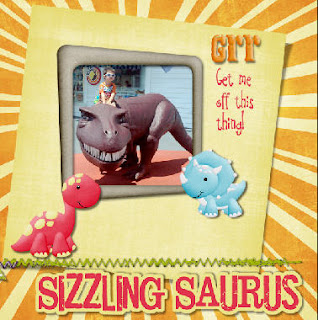
Patterns/Paper

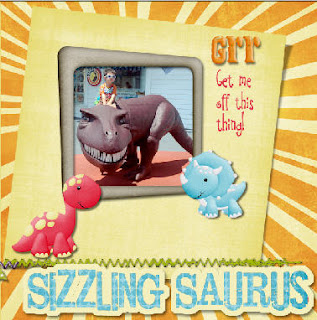
And this is the finished page using this font treatment:
I hope you enjoyed this quick and easy way to create your own alpha words. It really makes your title stand out. Because of Christina's whimsical style, its a perfect technique to use with her fun kits.
Be sure to pop over to ScrapMatters to see what other goodies Wimpy Chomper's Creations has.
Lets say you just did the cutest layout but the kit didn't come with an alpha, or you really love one of the papers or patterns in a kit and want to coordinate your alpha to that, or, well, any number of reasons. Here is a simple way to make your fonts work for you:
1) Select a font that matches the layout style. This whimsical kit, Camden's Buddies, has a bunch of fun, adorable dinosaurs, so I wanted a rough yet playful title art. I selected Jailbird Jenna because of its 'broken' nearly concrete feel and the offset baseline of the letters.

2) I typed the words in the size I wanted. I called my page Sizzling Saurus.
3) Then, in your Layer's menu, select 'Rasterize' (about half-way down the pulldown menu). This converts the editable type into pixels.
From here you can do a number of things. I'm going to show you 2 that are a quick and easy way to make a coordinating alpha for your layout.
Stickers
Do steps 1- 3 from above
4) Creating a font sticker is a simple as stroking your rasterized words. With your word layer selected, Go to: Edit >Stroke.
5) Use a wide point size to get a thick sticker border, lets say I put in 10 here. And then I select the color by clicking on the color box. I use the eye dropper tool to select a color within my layout to make sure it all fits nicely together. 
6) Then create your shadow or use as you would any other alpha. What I love about this method is that the word can all connect. I think its a fun look. 
This is my page with the sticker alpha words I created.

Patterns/Paper
The second alpha type trick is to take your rasterized word, make it into a mask by pulling in a fun patterned paper. Do up to step 3 from above.
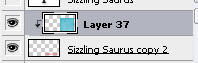
4) select the paper you like, then bring it in on a new layer, above the rasterized type layer.
5) holding down the Ctrl key (Cmmd key on a Mac), click on the line between your paper layer and your rasterized words in your layer palette. This clips the paper to your words.

6) Go to your word layer and select just the letters. (a quick and easy way to do this is to select all (ctrl A /cmmd A) then using your arrow keys, nudge the selection. It will automatically select just the words on this layer).
7) add a new empty layer and, with the outline of the words selected from step 6, go to Edit> Stroke. Select the color and stroke width (I chose 10 pts and the pale yellow from my background paper).
8) add a slight drop shadow and there, you have a sticker alpha created from your paper.

And this is the finished page using this font treatment:

I hope you enjoyed this quick and easy way to create your own alpha words. It really makes your title stand out. Because of Christina's whimsical style, its a perfect technique to use with her fun kits.
Be sure to pop over to ScrapMatters to see what other goodies Wimpy Chomper's Creations has.
Subscribe to:
Posts (Atom)